
Affichez le calendrier Windows en survolant l'heure avec la souris Display Windows Calendar in flying time with the mouse
 Sous Windows, lorsqu'on veut afficher le calendrier, il faut faire un clic droit sur l'heure dans la barre des tâches, puis choisir Ajuster la date / l'heure , ou bien double-cliquer sur l'heure. On Windows, when you want to display the calendar, you must right click on the clock in the taskbar and choose Adjust Date / Time, or double-click on the hour.
C'est assez rapide mais il ya mieux : visionner ce calendrier directement au survol de l'heure par la souris. It's pretty fast but there's more: watch this calendar directly to the overflight of the day by the mouse. C'est ce que propose le freeware So does the freeware QuickMonth Calendar QuickMonth Calendar avec en prime un petit plus : l'affichage du numéro des semaines. with a little extra bonus: the display of the number of weeks.
Voici une petite introduction pour commencer à l'utiliser… Here is a brief introduction to start using ...
Installation Installation
Bonne nouvelle : QuickMonth Calendar est une Good news: QuickMonth Calendar is a application portable portable application donc pas besoin d'installation, il suffit d'exécuter le fichier .exe disponible not require installation, simply run the. exe available ici here . . Vous pourrez aussi l'exécuter à partir d'une clé USB. You can also run from a USB key.
Si vous désirez que QuickMonth Calendar se lance au démarrage de windows, ajoutez simplement un raccourci dans le menu démarrer. If you want QuickMonth Calendar starts at windows startup, just add a shortcut in start menu.
Remarque : pour sortir du programme, il faudra aller dans le gestionnaire des tâches et mettre fin au processus qmc.exe Note: To exit the program, it will go into the task manager and end the process qmc.exe
Lancement Launch
QuickMonth Calendar peut être lancé en ligne de commande avec plusieurs options : QuickMonth Calendar can be launched from the command line with several options:
- /x:0000 : position horizontale du calendrier (remplacez 0000 par le nombre de votre choix) / X: 0000: horizontal position of the calendar (replace 0000 by the number of your choice)
- /y:0000 : position verticale du calendrier (remplacez 0000 par le nombre de votre choix) / Y: 0000: vertical position of the calendar (replace 0000 by the number of your choice)
- /nokey : désactive le raccourci clavier Windows+Q / NOKEY: disable the keyboard shortcut Windows + Q
- /weeks : affiche le numéro de la semaine dans le calendrier / Weeks: Displays the week number in calendar
- /notoday : pour ne pas afficher la date du jour en bas du calendrier / Notoday: to not display the current date at the bottom of the calendar
Fonctionnalités Features
Voici la liste des fonctionnalités : Here is the list of features:
- Pour accéder facilement à la date du jour, faites un clic droit+ aller aux liens du jour sur le calendrier ou cliquez sur la date du jour For easy access to the current date, right click + go to the links of the day on the calendar or click today's date

- Utilisez les boutons pour changer le mois ou cliquez sur le nom du mois, et choisissez celui qui vous convient : Use the buttons to change the month or click on the month name and select one that suits you:

- Cliquez sur l'année pour la modifier : Click the year for change:

- Le calendrier détecte automatiquement la position de la barre des tâche de windows, vous pouvez donc la déplacer là où vous le désirez, Quick Calendar suivra. The calendar automatically detects the position of the Windows task bar, so you can move it wherever you want, follow Quick Calendar.
- Le look du calendrier change en fonction des couleurs de votre système The look of the calendar changes colors depending on your system
Conclusion Conclusion
Voici une application fort sympathique dans la catégorie productivité qui met en exergue une fois de plus les limitations de windows. Here is a very nice application in the productivity category, which highlights once again the limitations of Windows. J'avais déjà ressenti le manque par rapport au numéro des semaines et ce petit logiciel vient à point. I had already felt the shortage compared to the number of weeks and this little software is timely.
On remarquera aussi que QuickMonth Calendar est très jeune et n'a certainement pas fini de nous simplifier la vie. Note also that QuickMonth Calendar is very young and certainly has not stopped our lives easier. Vous pourrez poster vos suggestions sur le You can post your suggestions on site de l'auteur author site . .
Version testée : 1.2 Tested version: 1.2
Vos commentaires sont les bienvenus… Your comments are welcome ...
Update 21/01/2008 : en réponse au commentaire de Primael Update 21/01/2008: in response to the comment Primael
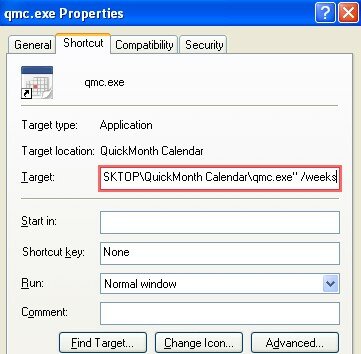
Pour pouvoir voir les semaines, il faut ajouter le paramètre /weeks à la ligne de commande en allant dans les propriétés du raccourci du programme qmc.exe. To see the weeks, we must add the / weeks at the command line by going to the properties of the program shortcut qmc.exe.
Pour cela, cliquez droit sur le raccourci et choisissez propriétés puis remplissez le champ cible comme ceci: To do this, right-click the shortcut and choose properties and then fill the target field like this:

Mots-clefs : Tags: calendrier Calendar , , efficacité efficiency , , freeware freeware , , heure hour , , portable application Mobile application , , souris mouse
Articles similaires (en théorie) : Like (in theory):
Il ya un an sur C'éclair! A year ago on C'éclair! – septembre 2007 - September 2007
Un magnifique calendrier 2008 au format Excel A beautiful 2008 calendar in Excel format
Génialissime : manipulez efficacement vos fenêtres avec NiftyWindows Génialissime: Treat your windows effectively with NiftyWindows
Il ya un an sur C'éclair! A year ago on C'éclair! – janvier 2008 - January 2008
Il ya un an sur C'éclair! A year ago on C'éclair! – novembre 2009 - November 2009


Greg Butler Greg Butler said, Said,
Wrote on Wrote on septembre 12, 2007 @ 17:51 September 12, 2007 @ 17:51
Merci, Greg. Thank you, Greg.
piR said, piR Said,
Wrote on Wrote on septembre 12, 2007 @ 18:43 September 12, 2007 @ 18:43
Super utile Super useful
gros défaut : après l'installation, il faut trouver l'application tout seul pour l'éxécuter big flaw: after installation, you must find the application itself to run
je suis gentil je vous le donne c:\windows\ I'm nice I give c: \ windows \
piR said, piR Said,
Wrote on Wrote on septembre 12, 2007 @ 18:45 September 12, 2007 @ 18:45
évidemment la seconde d'après, en voulant l'y mettre, je me rends compte qu'il est dans Programmes/Démarrage course a second later, wanting to put it there, I realize that it is in Programs / StartUp
(donc ton texte est à changer) (So your text is to be changed)
Argancel Argancel said, Said,
Wrote on Wrote on septembre 13, 2007 @ 8:01 September 13, 2007 @ 8:01
@piR : @ PIR:
Merci de nous faire partager tes expériences. Thank you for sharing your experiences.
Tu as téléchargé la version avec installeur. You have downloaded the version with installer. Moi, dans l'article, je parle de la version portable, donc le texte n'est pas faux. Me in the article, I talk about the portable version, so the text is not true. Par contre il est vrai que j'aurais pu préciser qu'il ya une version avec installeur. By cons, it is true that I could specify that there is a version with installer.
ANJUBAULT said, Anjubault Said,
Wrote on Wrote on octobre 14, 2007 @ 21:52 October 14, 2007 @ 21:52
super éclectique et pratique super eclectic and practical
christophe said, Christopher Said,
Wrote on Wrote on octobre 21, 2007 @ 14:56 October 21, 2007 @ 14:56
Bonjour, Hello,
super appli, mais je galère pour paramétrer l'affichage du numéro de semaine. great app, but I set the galley to display the week number.
le fichier .txt qui accompagne donne une manoeuvre qui n'est pas faisable. the. txt file that accompanies giving a maneuver that is not feasible.
Il propose d'ajouter /weeks dans la case cible de l'appli dans le menu démarrer de windows. It proposes to add / weeks in the target box in the application start menu.
Mon windows (xp) refuse d'accepter cet ajout. My windows (xp) refuses to accept this addition.
je dois m'y prendre mal, I have to go about it wrong,
je suis preneur d'un tuyau. I am taking a hose.
merci thank you
Chasqui Chasqui said, Said,
Wrote on Wrote on décembre 10, 2007 @ 18:04 December 10, 2007 @ 18:04
Bonjour les amis Hello friends
Une nouvelle version est disponible à A new version is available at http://www.esnips.com/web/qmc/ http://www.esnips.com/web/qmc/
Argancel Argancel said, Said,
Wrote on Wrote on décembre 10, 2007 @ 19:04 December 10, 2007 @ 19:04
@Chasqui : Merci pour l'info, c'est un honneur d'avoir un commentaire de l'auteur même du sujet de l'article! @ Chasqui: Thanks for the info, it's an honor to be a commentary on the author himself the subject of the article!
Primael said, Primael Said,
Wrote on Wrote on janvier 21, 2008 @ 10:55 January 21, 2008 @ 10:55
Bonjour, Hello,
Felicitations pour cette idee simple, donc assez geniale. Congratulations for this idea simple, so pretty awesome.
Juste un petit souci: je ne parviens pas a afficher les numeros de semaines… Just one small problem: I can not see the numbers of weeks ...
Pourriez-vous expliquer en detail au novice que je suis comment ajouter cette ligne « /weeks »? Could you explain in detail the novice that I am how to add this line "/ weeks?
Merci de votre aide, et encore bravo. Thank you for your help, and congratulations.
Argancel Argancel said, Said,
Wrote on Wrote on janvier 21, 2008 @ 12:56 January 21, 2008 @ 12:56
@Primael : merci pour ces encouragements, mais il faut surtout remercier le créateur de cet utilitaire. Primael @: thank you for this encouragement, but above all thank the creator of this utility.
Pour votre question, j'ai ajouté ma réponse en image à la fin de l'article. For your question, I added my response image at the end of the article. Si ce n'est pas clair, signalez-le moi. If it is not clear, tell me.
nico said, Nico Said,
Wrote on Wrote on mars 22, 2008 @ 14:54 March 22, 2008 @ 2:54 p.m.
Salut à vous Hello to you
Savez vous comment avoir l'affichage des semaines lorsqu'on utilise vista. Do you know how to have the display for weeks when using vista.
En effet, quand j'essaye de rajouter /weeks à la cible, j'obtiens le message d'erreur suivant:le nom « xxxx » spécifié ds le champ cible n'est pas valide Indeed, when I try to add / weeks to the target, I get the following error message: The name "xxxx" ds specified target field is not valid