Comment extraire les fichiers contenus dans un fichier d'installation? How to extract the files into an installation file?
 Saviez-vous que la plupart des installeurs sont en fait des archives contenant de nombreux fichiers à copier sur votre ordinateur? Did you know that most installers are actually archives containing many files to copy on your computer?
Pour vous en convaincre, vous pouvez utiliser le programme To convince you, you can use the program Universal Extractor Universal Extractor . . C'est une application qui permet d'extraire la plupart des formats d'archive et en particulier les fichiers d'installation. This is an application that can extract the most archive formats and in particular the installation files.
Son utilisation est on ne peut plus simple, il suffit de sélectionner l'archive à extraire et le répertoire de destination : Its use could not be simpler, just select the archive to extract and the destination directory:

Vous obtiendrez typiquement les fichiers et répertoires suivants : You typically get the files and directories:
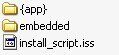
Le fichier install_script.iss correspond au script utilisé pour copier les fichiers dans l'ordinateur. The file install_script.iss is the script used to copy files into the computer. Tandis que vous trouverez certaines ressources comme des icônes dans le répertoire embedded . While you will find some resources like icons embedded in the directory. Enfin, les fichiers exécutables se retrouveront dans le répertoire {app} . Finally, the executable files will be found in the (app).
La manipulation a plusieurs intérêts, par exemple : The handling has several advantages, for example:
- vérifier que certains spywares ne sont pas contenu dans l'archive verify that some spyware are not contained in the archive
- rechercher une dll dont vous avez besoin find a dll you need
Et surtout : exécuter une application sans l'installer , bien que certains programmes risquent de ne pas fonctionner normalement de cette façon. And above all: run an application without installing it, although some programs may not function normally in this way.
Si vous désirez avoir la liste des logiciels qui fonctionnent de manière autonome simplement en décompressant l'installeur, la meilleure adresse est ici : If you want a list of software that operate independently simply by unzipping the installer, the best is here: The Portable Freeware Collection The Portable Freeware Collection
Notez que décompresser l'installeur pour lancer directement l'exécutable contenu à l'intérieur n'empêchera pas le programme d'inscrire des clés dans le registre , ce qui prive le logiciel d'une partie de sa portabilité. Note that unpack the installer to directly launch the executable content inside will not stop the program to include keys in the registry, which deprives the software part of its portability.
Si vous désirez aller plus loin, vous pourrez alors suivre l'excellent article If you want to go further, you can then follow the excellent article portabiliser une application portabiliser application chez Papoo. at Papoo.
Pour finir, sachez que Universal Extractor est une application gratuite, portable et très légère. Finally, note that Universal Extractor is a free, portable and lightweight.
Vous pourrez la télécharger chez You can download it at legroom legroom grâce au lien “UniExtract Binary Archive” pour la version portable. by the link "UniExtract Binary Archive" for the portable version.
Tags: Tags: archive archive , , exe exe , , extraire extract , , install install , , portable application mobile application , , setup setup , , windows windows
Articles similaires (en théorie) : Like (in theory):
Localisez graphiquement les fichiers qui surchargent votre disque dur Locate the graphic files that overload your hard drive
Comment conserver l'historique des copier coller sous Windows? Storing the history of copy paste in Windows?
Une astuce pour ouvrir vos fichiers avec le bon programme A trick to open your files with the right program
Il ya un an sur C'éclair! A year ago on this Thread! - juillet 2007 - July 2007
Déboguer Windows : la copie de fichiers selon SuperCopier Debug Windows: copy files by SuperCopier


name name said, said,
Wrote on Wrote on septembre 1, 2008 @ 5:38 September 1, 2008 @ 5:38
Good day!, Good day!,
name name said, said,
Wrote on Wrote on septembre 1, 2008 @ 7:31 September 1, 2008 @ 7:31
Hello!, Hello!,