5 essential easy ways under Excel

Excel belongs to the commercial software of reference that everyone knows.
After a first article which indicated a manner of comparing lists under Excel, I return here at the base with some easy ways that each one must know to be effective.
With the menu:
- How to jump a line in a cell?
- To decontaminate the autocorrection
- Power of special joining
- How to choose a custom color for your cells?
- To mask and uncover columns/lines
How to jump a line in a cell?
When one types in a cell and that one wants to pass to the line, it would be logical to type simply entered. However the entered key makes pass to the following box.
How to thus make? The answer is simply to type the combination of keys <alt+entr�e>
This will avoid you a stupid question near a colleague
To decontaminate the autocorrection
The function autocorrection in vain tries to save to you time while correcting automatically when you type. It can also exasperate of them more one. To modify the parameter setting by defect, go in tools > options of correction and strip the corrections which you do not need:

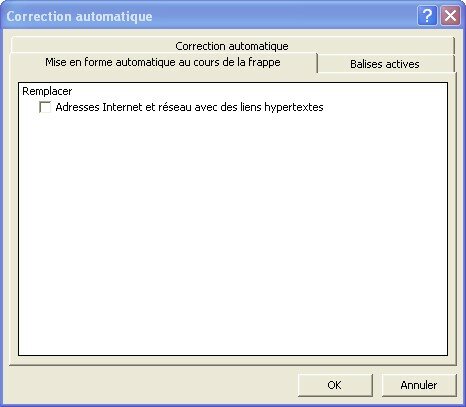
In the mitre Formatted automatic during striking, you will be able to decontaminate another awkward autocorrection: that of the bonds Web, which appear cliquables automatically:

Annoying with this behavior, it is that Excel opens the Web navigator when you click on a cell containing a bond. You can thus find you in your navigator Web, whereas you want simply to modify the cell which contains the bond. The best means is thus than Excel formatted step the cell like a bond Web:
Power of special joining
Special joining is one of my preferred functionalities. It makes it possible to stick only part of the cell copied, for example the format (bottom of the cell, organizes, fatty, Italic), the contents, the comments, the formulas:

Note the function to stick with connection, very useful, which enables you to bind the value of two fields.
If you stick HTML, you will have also the possibility of copying only the text and not the beacons:

How to choose a custom color for your cells?
A many software contains custom colors but it is not the case of Excel:

To use a custom color, you will have straightforwardly to thus modify an existing color in Tools > Options:

The pallet appears when you click on the button To modify :

To mask and uncover columns/lines
To mask a column or a line is very simple, it is enough to click with the right button of the mouse on the corresponding letter and to choose To mask:

But how to uncover it then? Knowing that one cannot any more select it:

Answer: select the two surrounding columns and click on posting:

Conclusion
I hope that these easy ways will have you permi to learn some tricks. Do not miss the next articles, which will make it possible to go further.
You can react in this article in the comments.
Tags: easy way, effectiveness, Excel, hackIf you liked this article, give him more visibility as a voter for him on Scoopeo:
Similar articles (in theory):
It is the re-entry: who wants a model of timetable?
A splendid calendar 2008 with the Excel format
There is one year on It flash! - July 2007
A tool of free breakdown service to compare Excel lists
How to sort a list of blogs according to their index of Technorati popularity?


GHALIB said,
Wrote one November 28,2007 @ 15:43
THANK YOU VERY MUCH FOR JOINING HTML
IN MY TURN I AM IN FAVOUR REALITY THAT EXCEL EAST IMPOSSIBLE TO CIRCUMVENT IF ONE WANTS THE SPEED AND THE PRECISION
I AM IN the FIELD OF the MANAGEMENT OF the BUDGETS Of INVESTMENT AND THIS TOOL HAS Me PERMI TO CONTROL CONTROL AND the REPORTING VERY WELL
I AM READY ANY EXCHANGE
Argancel said,
Wrote one November 28,2007 @ 15:52
@GHALIB: yes Excel is a really powerful tool when it is controlled
BOUCHET said,
Wrote one December 22,2007 @ 13:20
Thank you for the choice personalized for the colors, which I could not carry out under Excel.
bemer said,
Wrote one January 28,2008 @ 21:48
personalized format
in a cell when I type BEMET, I will like that it registers HOUSE BEMET
HOW CAN I MAKE
THANK YOU For the Answer
Keg�nie said,
Wrote one April 19,2008 @ 0:14
When one masks the column has, it is necessary to go in Edition then To reach then to type A1 under the line reference, without that, one cannot post the column more has
Argancel said,
Wrote one April 19,2008 @ 13:43
@bemer: Outils>Options of autocorrection: to add substitution BEMET > HOUSE BEMET and to notch the box correction in the course of striking.
Afflicted delay: /
@Keg�nie: well considering, I had not thought of the problem of the first lines/hidden columns.
mbark said,
Wrote one June 5,2008 @ 0:56
thank you with you mour img
Sylvie said,
Wrote one September 4,2008 @ 14:54
Thank you very much for these easy ways.
Sylvie, autodidact in data processing
aguida said,
Wrote one February 7,2009 @ 20:59
thank you for these tricks it is really util for the users of Excel